Desktop screen lookup
Hover over a word in game dialogue to see its reading and meaning. Manatan recognizes the text and opens the dictionary over your game.
Desktop
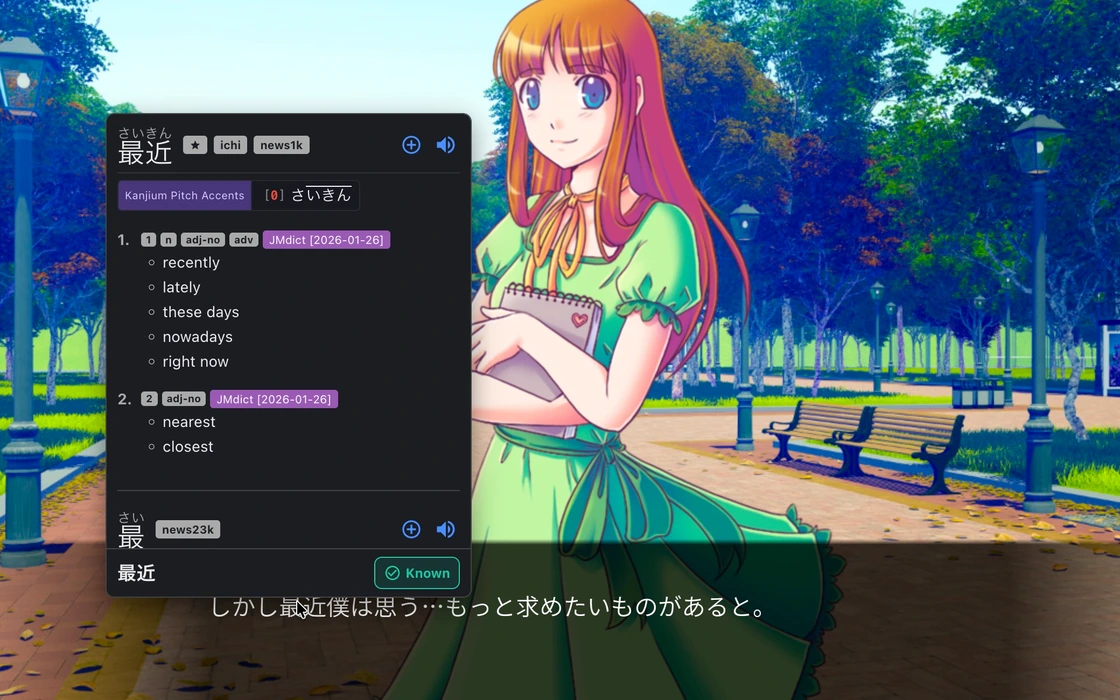
Choose how to open the dictionary
Use automatic scanning and “Show popup without hotkey” to look up words by hovering. If you prefer a shortcut, turn off “Show popup without hotkey” and hold Shift while pointing at a word. You can change the lookup key in Settings.
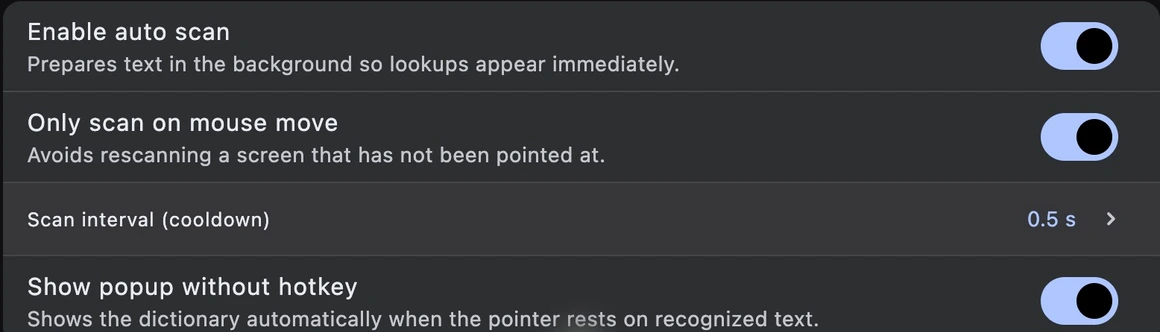
Set up Screen lookup
Add a dictionary
Import a dictionary for the language you want to look up.
Dictionary setupTurn on Screen lookup
Open More in Manatan and enable Screen lookup. Choose your text recognition provider in Settings and allow screen capture if prompted.
Hover over a word
In Settings → Screen Lookup, enable “Show popup without hotkey.” Return to your game and rest the pointer over a word.
Requirements
- macOS
- Allow Manatan under Screen & System Audio Recording in System Settings if prompted.
- Windows and Linux
- The lookup trigger depends on your setup. On Wayland, use the screen or window picker when prompted.
- Text recognition
- Accuracy depends on the text, language and recognition provider. Protected content can block screen capture.